Back to blog
Scrape TripAdvisor with Confidence: The Ultimate Guide


If you are in the travel industry, chances are you are familiar with TripAdvisor. Here we will share with you the methods to scrape TripAdvisor, one of the largest travel websites in the world.
TripAdvisor is an online platform that helps users plan and book trips by offering reviews, ratings, and recommendations on hotels, restaurants, attractions, and more. With millions of reviews, photos, and other content, TripAdvisor can be a valuable source of information for businesses and individuals looking to enhance their travel experiences. That is why TripAdvisor web scraping can be very valuable if you know how to use the data you get.
However, manually extracting data from TripAdvisor can be a time-consuming and daunting task. This is where a TripAdvisor scraping comes in handy. In this guide, we will explore what a scraper is, how it works, and how to extract valuable data from TripAdvisor.
What is a TripAdvisor Scraper?
A TripAdvisor scraper is a tool that automates the process of extracting data from TripAdvisor. It works by scraping websites for information such as reviews, ratings, and photos and saving it in a structured format that can be easily analyzed and used for various purposes.
Several TripAdvisor scrapers are available in the market, each with its own features and capabilities. Some scrapers are free, while others require a subscription or one-time payment. In the article, we will consider several popular scraping services, as well as the option of TripAdvisor data scraping using Python.
Why Scrape TripAdvisor Data?
There are many reasons why TripAdvisor web scraping can be useful for you, and the data collected can be valuable. Here are some of them:
- Research: Scraping TripAdvisor can provide valuable insights into customer sentiment, preferences, and behaviors. This data can be used to inform market research, competitive analysis, and product development.
2. Reputation management: Can help businesses monitor their online reputation and track customer feedback. This information can be used to identify areas for improvement and respond to negative reviews.
3. Pricing and availability: Scraping can help businesses stay up-to-date on pricing and availability information for hotels, flights, and other travel-related services.
4. Content creation: Can provide inspiration and raw material for travel-related content.
The scope of the collected data can be much wider and limited only by your goals and means of analysis.
TripAdvisor Web Scraping: Types of Data
TripAdvisor contains a wealth of information about hotels, restaurants, and other travel-related services. Some examples of the types of data that can be scraped from TripAdvisor include:
- Reviews: Scraping TripAdvisor reviews allows businesses to overview and consider plenty of detailed reviews of hotels, restaurants, and attractions. These reviews can include information about the quality of service, cleanliness, value for money, and more.
- Ratings: TripAdvisor uses a rating system that allows users to rate hotels, restaurants, and attractions on a scale of one to five stars. These ratings can be used to gauge customer satisfaction and identify popular destinations.
- Location data: TripAdvisor includes information about the location of hotels, restaurants, and attractions, including maps and directions.
- Pricing and availability: TripAdvisor provides pricing and availability information for hotels, flights, and other travel-related services. This information can be scraped to help businesses stay up-to-date on market trends and pricing.
- Photos: TripAdvisor allows users to upload photos of hotels, restaurants, and attractions. These photos can be scraped to create visually appealing travel-related content.
- User profiles: TripAdvisor allows users to create profiles and track their activity on the site. This information can be scraped to identify trends in user behavior and preferences.
If you want to achieve significant results in your chosen niche, you can not do without a deep analysis of all the tools that your potential competitors have.
TripAdvisor Data Scraping: Examples of Services
TripAdvisor is a popular travel website that contains a lot of valuable data for tourists and those interested in this niche from the inside. It is not surprising that on the Internet, we can find many services ready to help you with TripAdvisor scraping.
Here are five examples of paid scraping services that can offer this functionality:
ScrapeHero is a web scraping service that offers data extraction from websites. ScrapeHero provides a range of services, including custom data extraction, data cleansing, and data enrichment. With ScrapeHero, users can extract data such as hotel names, addresses, ratings, reviews, and other relevant information.
Octoparse is a cloud-based web scraping tool that allows users to extract data from various websites, including TripAdvisor. With Octoparse, users can scrape data such as hotel names, ratings, reviews, and other relevant information.
Scrapy is an open-source web scraping framework that allows users to build custom spiders to extract data from websites. Scrapy provides a range of features and tools to help users scrape data from TripAdvisor, including handling JavaScript, handling cookies, and extracting data from HTML.
ParseHub is a web scraping tool that allows users to extract data from TripAdvisor, among other websites. ParseHub offers an intuitive point-and-click interface, allowing users to build custom scraping projects without coding knowledge. With ParseHub, users can extract data such as hotel names, addresses, ratings, reviews, and other relevant information.
Datahut is a web scraping service specializing in data extraction from TripAdvisor and other travel websites. Datahut provides various services, including custom data extraction, data cleansing, and data enrichment. With Datahut, users can extract data such as hotel names, addresses, ratings, reviews, and other relevant information.
How To Scrape TripAdvisor Data Using Python
Scraping data from websites is common in data analysis and web development. One frequently scraped website is TripAdvisor, which contains a wealth of information on hotels, restaurants, and attractions.
Next, you will learn how to scrape TripAdvisor data using Python step by step. We will use the BeautifulSoup and requests libraries to scrape data from TripAdvisor’s website.
Step 1: Install the Required Libraries
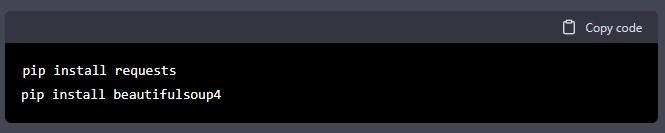
Before we can begin scraping, we need to install the required libraries. To install the libraries, open your command prompt or terminal and type the following commands:
Step 2: Find the URL for Scraping
To start scraping TripAdvisor, we need to find the URL of the webpage we want to scrape. For this article, we will implement scraping TripAdvisor reviews for a specific restaurant. To find the URL for the restaurant, go to TripAdvisor’s website and search for the restaurant.
Once you find the restaurant, click on the Reviews tab. In the URL bar of your web browser, you will see the URL for the reviews page. Copy this URL, as we will use it in the next step.
Step 3: Retrieve the HTML Content
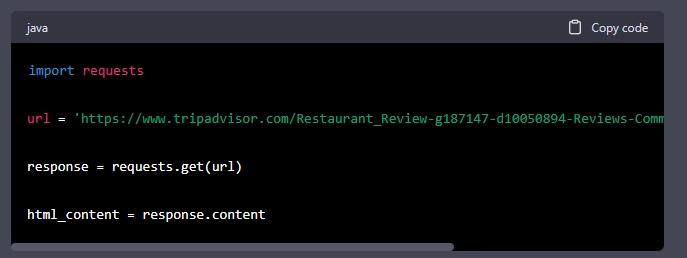
To retrieve the HTML content of the webpage, we will use the requests library. The following code shows how to retrieve the HTML content:
In this code, we first import the requests library. We then define the URL of the restaurant we want to scrape. We use the “requests.get()” function to retrieve the content of the webpage. Finally, we save the HTML content to a variable called “html_content”.
Step 4: Parse the HTML Content
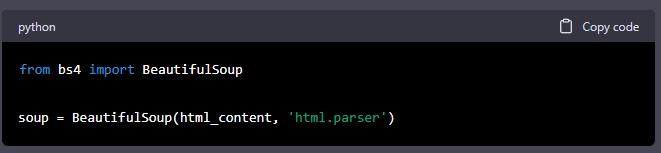
Now that we have the HTML content of the webpage, we need to parse it to extract the data we want. We will use the BeautifulSoup library to parse the HTML content. The following code shows how to parse the HTML content:
In this code, we first import the BeautifulSoup library. We then use the “BeautifulSoup()” function to parse the HTML content. We save the parsed content to a variable called “soup”.
Step 5: Extract the Data
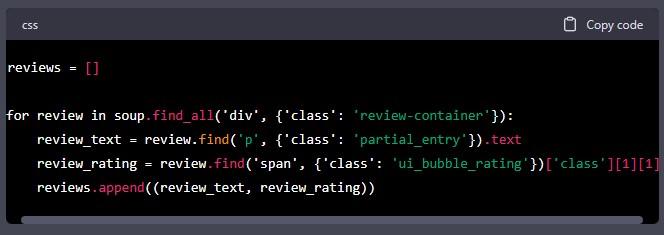
Now that we have parsed the HTML content, we can extract the data we want. In this article, we will extract the review text and the review rating. The following code shows how to extract the review text and rating:
In this code, we first create an empty list called reviews. We then use a for loop to loop through all the review containers on the webpage. For each review container, we extract the review text and rating. We save the review text and rating as a tuple and append it to the reviews list.
Step 6: Print the Data
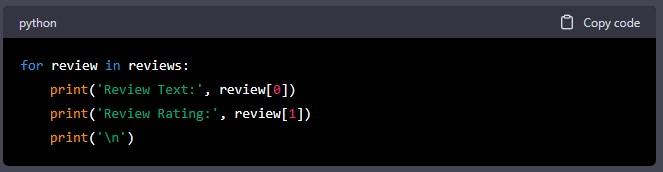
Finally, we can print the data we have extracted. The following code shows how to print the review text and rating:
In this code, we use a for loop to loop through all the reviews in the reviews list. For each review, we print the review text and rating.
Step 7: Refine the Data
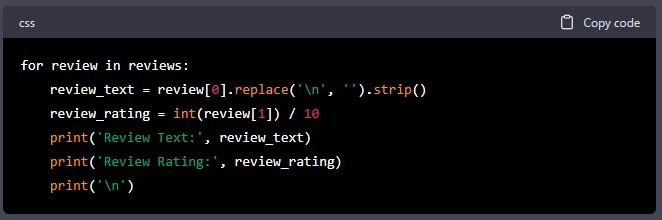
Sometimes the data extracted from the webpage may contain unwanted characters or information. In this case, we may need to refine the data to make it more usable. For example, we may want to remove any unwanted characters from the review text or convert the review rating from a string to an integer.
The following code shows how to refine the data:
In this code, we use the “replace()” function to remove any newline characters and the “strip()” function to remove any leading or trailing whitespace from the review text. We also convert the review rating from a string to an integer and divide it by 10 to get the rating on a scale of 1 to 5.
Step 8: Save the Data
Once we have extracted and refined the data, we may want to save it to a file or database for later analysis. The following code shows how to save the data to a CSV file:
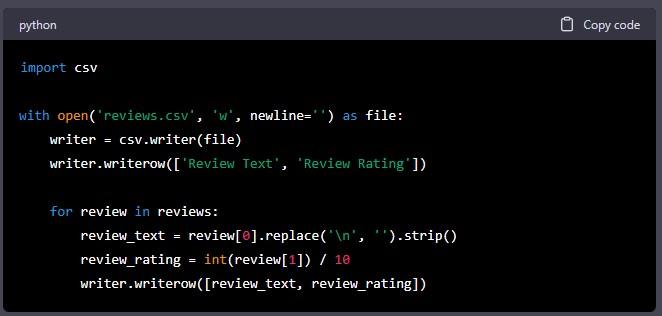
In this code, we first import the csv library. We then use the “open()” function to create a new CSV file called “reviews.csv”. We use the “csv.writer()” function to create a writer object, and we write the column headers to the file.
We then use a for loop to loop through all the reviews in the reviews list. For each review, we extract the review text and rating, and we write it to the CSV file using the “writerow()” function.
Scraping TripAdvisor using Python can be a powerful way to extract data for analysis or web development. We covered how to scrape TripAdvisor using Python and the BeautifulSoup and requests libraries. We also covered how to extract, refine, and save the data.
TripAdvisor Web Scraping: DataOx’s Contribution
Scraping data from TripAdvisor — as well as scraping TripAdvisor reviews can be a valuable way to gain insights into the travel industry and make data-driven decisions. By using paid scraping services like Octoparse or ParseHub, you can automate the process and extract data in a matter of minutes, without any prior experience with web scraping. If you have the necessary knowledge and skills to work with Python, we can set up site scraping on our own, taking into account all the necessary parameters.
Both TripAdvisor scraping options require you to either invest money or special skills and time. Do not forget about the processing, structuring and analysis of data, which can take a huge amount of time and resources. Contact us for a free consultation and learn more about scraping data from the TripAdvisor website and how it works.

web scraping services
Get free consultation
FAQ about How to Scrape TripAdvisor
What is the difference between data scraping and web scraping?
Data scraping is a broad term that includes web scraping. Even though both services provided by DataOx describe the process of automatically extracting data, web scraping refers to harvesting data specifically from websites, while data scraping encompasses extracting information from any source, for example, mobile applications, databases, PDF files, screens, and many more.
How to scrape TripAdvisor reviews?
One of the easiest ways to scrape TripAdvisor reviews is by using Python and BeautifulSoup libraries. To simplify the task, DataOx wrote a step-by-step guide: find it in a block called “How to Scrape TripAdvisor Website Using Python.” It is easy to apply even if you are not a developer!
How to choose reliable TripAdvisor scraper?
To choose a reliable TripAdvisor scraper, one should consider and evaluate the following features: 1) an ability to bypass anti-bot protection and CAPTCHA considering updates of protection; 2) speed and quality of data parsing 3) customer support and transparency of code documentation 4) scalability. TripAdvisor data scraping services, as DataOx, cover all the enumerated requirements permanently & steadily, and include custom solutions over and above basic ones.
Why scraping data from TripAdvisor?
DataOx, based on its experience, defines the following use cases of TripAdvisor data scraping:
- Research: customer sentiment, market research, competitive analysis, product development.
- Reputation management: reviews and business / brand mentions monitoring
- Prices monitoring: stay up-to-date on pricing and availability information for hotels, flights, and other travel-related services
- Content creation: inspiration and raw material for travel-related content
Is TripAdvisor data scraping legal?
Data scraping from TripAdvisor is not illegal if it extracts public data. A professional and experienced data scraping company should act justifiably and avoid extracting personal information. DataOx is a reliable choice, with 10+ years of operations and over 300 successful projects, including zero legal incidents. Read more about web scraping legality in our guide.
Stay ahead with data insights
Subscribe to DataOx newsletter






get a free consultation
Fill out the form — we'll get back to you with options tailored to your needs.
what happens next
We review your goals and get in touch to clarify scope
Your privacy is a priority — NDA available upon request.
You receive a clear proposal with timeline, budget, and delivery format.
Once approved, we start building your data pipeline.


contact us
Let's find the best solution for your data needs.

get a free consultation
Fill out the form — we'll get back to you with options tailored to your needs.
what happens next
We review your goals and get in touch to clarify scope
Your privacy is a priority — NDA available upon request.
You receive a clear proposal with timeline, budget, and delivery format.
Once approved, we start building your data pipeline.
contact us
Let's find the best solution for your data needs.